Posts

4 Reasons Why You Need to Switch to Microsoft Dynamics SL

 If you’re looking to implement a new project-driven ERP solution for your business, check out the new version of Microsoft Dynamics SL. Dynamic SL provides your business with the tools needed to increase efficiency, accuracy, and customer satisfaction. Here are more details: 1. Up-to-Date ERP System Microsoft developing team constantly improve the platform’s ERP system by fixing problems on a constant basis, adding more capabilities and features, and updating its hardware requirements. Therefore, the system remains functional and powerful with the progressing and fast-changing technologies despite years of existence. 2. Scalable Functionalities The functionalities of Microsoft Dynamics SL is very much scalable, so you can accomplish more tasks and become more efficient using the platform. It offers integration with some of the world’s leading and popular business applications and software such as Salesforce, Oracle, SkyDrive, Sybase, Windows, and Microsoft’s suite of tools to name...
Veelead Launching Microsoft Power BI Online Services

  What is Microsoft Power BI? Microsoft Power BI is a business intelligence platform that provides tools for aggregating, analyzing, displaying, and sharing data to nontechnical business users. For users who are familiar with Excel, Power BI's user interface is pretty intuitive, and its strong connectivity with other Microsoft products makes it an extremely adaptable self-service tool with little upfront training. Why Microsoft Power BI? Microsoft Power BI is used to uncover insights from a company's data. Power BI can help you combine different data sources, transform and clean the data into a data model, and visualize the data using charts and graphs. All of this information may be shared with other Power BI users in the company. The ability to run reports and surface insights based on a company's data is a significant benefit of Microsoft Power BI. Power BI can connect to a variety of data sources and "tidies up" the information it receives so that it may be mo...

Veelead Launching Dynamics 365 Human Resource Implementation and Support Solution

  What is Dynamics 365 Human Resource? Microsoft Dynamics 365 Human Resources (formerly known as Dynamics 365 for Talent) empowers the HR team and managers of your business with the tools they need to land top candidates and accelerate their success. Dynamics 365 Human Resources helps HR professionals obtain the necessary template information to build data-driven experiences for employees through compensation, benefits, leave of absence, payroll, performance, training and certification and self-service programs. Dynamics 365 Human Resources connects people and operations data to reduce the staffing costs and provides better care for employees. Benefits of Microsoft Dynamics 365 Human Resource implementation: It provides the technology infrastructure for your business to manage every component of the employee experience that includes compensation, benefits, attendance and PTO, compliance, performance feedback, training and certification, and self-service programs. It helps the manag...

What Is Microsoft PowerApps and How It Helps Your Organization?

  What Is Microsoft PowerApps? Power Apps is an application creator that allows users to build mobile- and web-based apps with low or no code. These apps can interact with data sources and services within the Microsoft 365 ecosystem. App creators can integrate business intelligence dashboards and automation into apps, making the platform more attractive to businesses. Initially, the developers see the Power Apps as a basic tool for users with varying levels of technical expertise. It was primarily an app design platform focused on enabling users to create interactive apps for various business requirements. However, the platform took off, and the proof of its success is its ability to address major challenges that organizations are facing. In recent upgrades, Microsoft even introduced model-driven apps, as well as the Power Apps Portal. Its advanced canvas apps, allows users to develop apps without coding in conventional programming languages, and remain flexible in designing and cu...

A SharePoint Customization Guide with the Tips and Tricks

The customization capabilities of SharePoint allow creating a variety of solutions adapted to the established process of your company. Solutions like intranets and portals, contract and document management systems, systems for learning management, knowledge management, ticketing and help desk can be managed. If your company already has SharePoint in use or only consider implementing a SharePoint-based solution , then here are the benefits of customizing the platform: Convenient UX and intuitive UI encourages employees to actively use SharePoint. Boosts employee performance and overall business efficiency Ensure smooth operating of integrated systems Allows you to create a hybrid SharePoint environment Make sure you follow best practices while customizing SharePoint. If the customization process goes wrong, you can end up with a confusing mess that is hard to put right. Follow our simple tips and tricks for designing your SharePoint Site to reach your level of suitability. Before starti...

Veelead Launching Dynamics 365 Supply Chain Management Implementation Service

 Dynamics 365 Supply Chain Management is an application of the Microsoft Dynamics 365 suite that enables enterprises to streamline, manage and improve their supply chain processes. previously, Dynamics 365 Supply Chain Management was the part of Dynamics 365 Finance & Operations application. This helps the businesses to modernize the supply chain as it uses data, analytics and AI across your operations to help the managers make smarter, more efficient business decisions from an all-inclusive vantage point. Many of these decisions would be highly advanced, as they involve latest technologies like machine learning and activities like advanced forecasting. What Dynamics 365 Supply Chain Management Can Do? 1. Perform production planning with real-time insights on production, distribution, and integrated warehouse management system 2. More effective stock management by resolving out of stock or overstock situations with enhanced machine learning guidance 3. Optimize production perf...

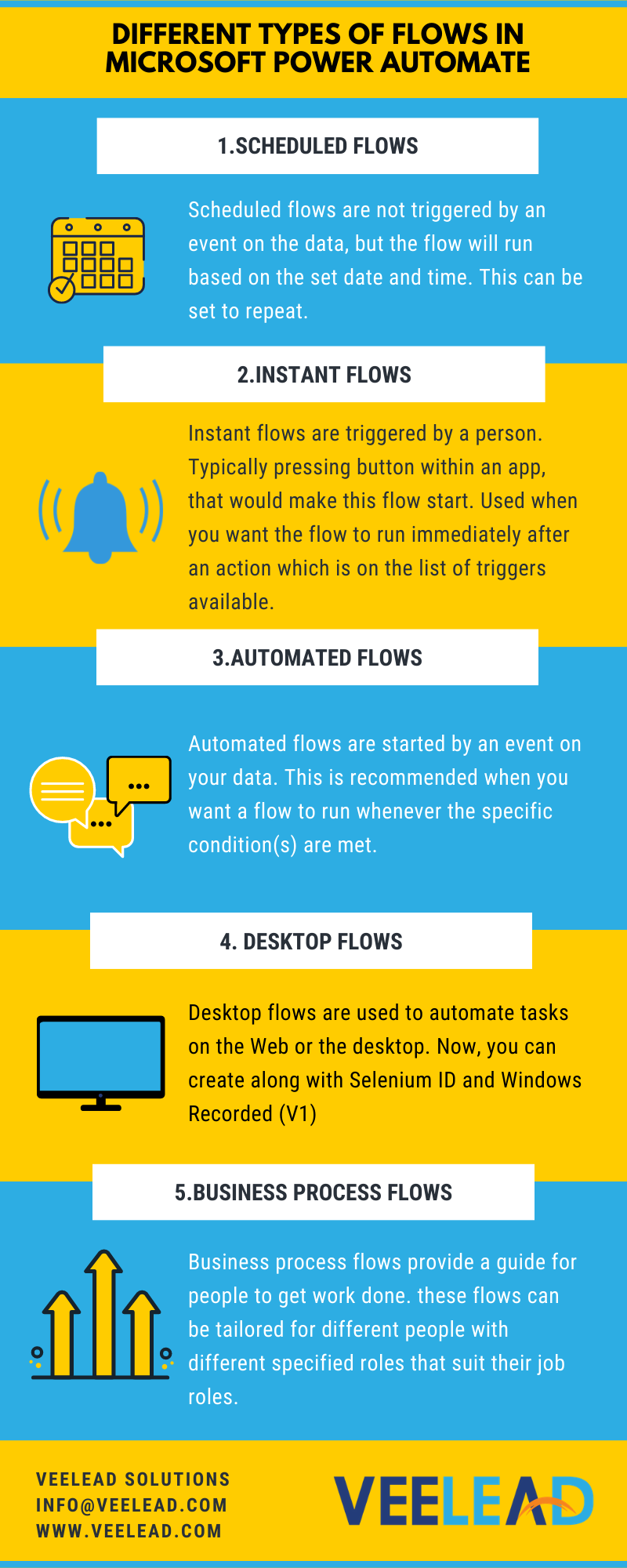
What are the Different Types of Flows in Microsoft Power Automate?

Image
Microsoft Power Automate: Microsoft Power Automate (earlier called as Microsoft Flow) is an centralized hub for automating business workflows on an enormous scale. The platform provides the features that leverage your favorite apps and services. Microsoft 365 has a wide range of business apps that are essential for effective office operations and thousands of organizations. Users can connect Microsoft 365 apps to each other or to a large library of other apps, but in the cloud and on-premises environments. Power Automation can be quickly and easily created, with the basic understanding of Office 365 anyone can create basic automation to make day-to-day business life easier. Microsoft provides pre-built automation templates called "Flows" that cover the most popular uses for Power Automate .   Different Types of Flows in Microsoft Power Automate: Hope you have noticed that some flows start immediately, where other flows seem to take a while before they get started. This is bec...